
Key Takeaways
- Ubersuggest gives you keyword research, content ideas, site audits, rank tracking and AI search tracking starting at $29/month, or $16/month billed yearly. A one-time lifetime plan starts at $290.
- Moz Pro starts at $99/month, or $79/month billed yearly, with no lifetime option. That’s more than three times Ubersuggest’s entry price month to month, and close to five times on yearly billing.
- Ubersuggest includes AI Search Visibility on every paid plan. It shows where AI mentions your brand, which sources AI cites, and a prioritized list of fixes to get you cited more often.
- Ubersuggest also works where you already work: inside WordPress through its plugin, and inside Claude and ChatGPT through its connector.
- Moz still makes sense for a narrower group: teams whose reporting runs on Domain Authority or who need local listings management through Moz Local.
For most marketers, Ubersuggest is the better choice. It covers keyword research, content ideas, site audits, rank tracking and AI search visibility starting at $29/month, less than a third of what Moz charges for its entry plan. Moz is worth a look if your clients measure progress in Domain Authority or you need to manage local business listings.
That’s the short version. The longer version matters, because search has changed fast. Google now answers a lot of questions with AI Overviews, people ask ChatGPT and Gemini what to buy, and “where do I rank” is only half the picture. The other half is if AI tools mention you at all.
Moz deserves its reputation. It’s been around since 2004 and gave the industry terms like Domain Authority. But reputation doesn’t pay your software bill, so let’s look at what each tool gives you today for the money.
How Do Ubersuggest and Moz Compare at a Glance?
| Ubersuggest | Moz Pro | |
| Starting price | $29/month (Individual), $16/month billed yearly | $99/month (Standard), $79/month billed yearly |
| Lifetime plan | Yes, from $290 one time | No |
| Free plan | Yes, plus a one-time 7-day free trial on monthly plans | Free trial on the Medium plan |
| Keyword research | Yes | Yes |
| Backlink analysis | Yes | Yes |
| Site audit | Yes | Yes |
| Rank tracking | Yes | Yes |
| Content ideas | Yes (Content Ideas, AI Prompt Ideas) | Yes (AI Prompt Suggestions) |
| AI content creation | AI Writer, full articles | AI Content Briefs |
| AI Chat | Yes, every plan | Not listed |
| AI search visibility tracking | Yes, every paid plan | Yes, every plan |
| Sentiment of AI mentions | Yes, every paid plan | Not listed on plans |
| AI citation tracking by source type | Yes (Citations) | Not listed on plans |
| Prioritized GEO action list | Yes (Opportunities) | Not listed on plans |
| WordPress plugin with AI fixes | Yes | No |
| Works inside Claude and ChatGPT | Yes | Not listed |
| Brands tracked for $49/month | 7 (Business) | None (plans start at $99) |
| Local listings management | No | Yes (Moz Local, sold separately) |
| Chrome extension | Yes | Yes (Mozbar) |
Prices and plan features change often. Check each vendor’s pricing page before you buy.
What Does Ubersuggest Do Best?
Ubersuggest was built for people who want answers fast without a two-week learning curve. Type a keyword or a domain, pick a country, and you get the data. Over the last couple of years it has added a lot on top of that core.
Keyword Research and Content Ideas
For any keyword you get search volume, CPC, SEO difficulty, paid difficulty, related suggestions and search intent. Every plan also brings ChatGPT and Gemini data into Keyword Research, so you see how a topic shows up in AI tools next to its Google numbers. You can also pull the keywords any domain ranks for, organic and paid, which makes competitor research a lot quicker.
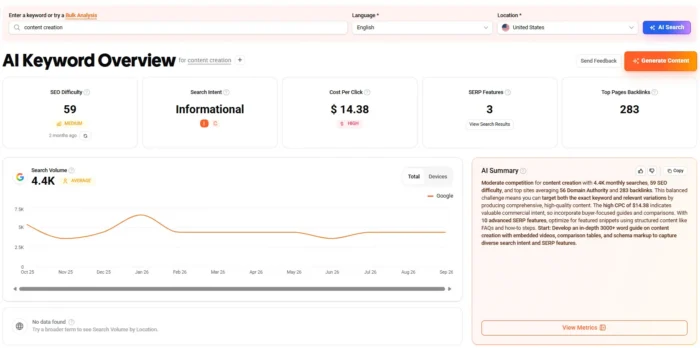
Two features help when you’re stuck on what to write next:
- Content Ideas shows the pieces on a topic that earned the most social shares, so you can see which headlines actually landed.
- AI Prompt Ideas shows the prompts people are likely to type into AI tools about your keyword, along with the brands mentioned, the intent behind each prompt and the sources that get cited.
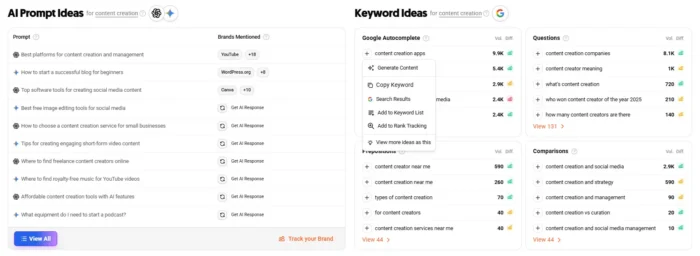
Once you know the topic, the AI Writer drafts full articles, and AI Chat lets you ask questions about your data in plain language.
AI Search Visibility
AI Search Visibility shows how often your brand appears in AI-generated answers from tools like ChatGPT and Gemini. Because AI answers can change from one run to the next, Ubersuggest runs multiple prompts per keyword and competitor set, then turns the results into a visibility share over time.
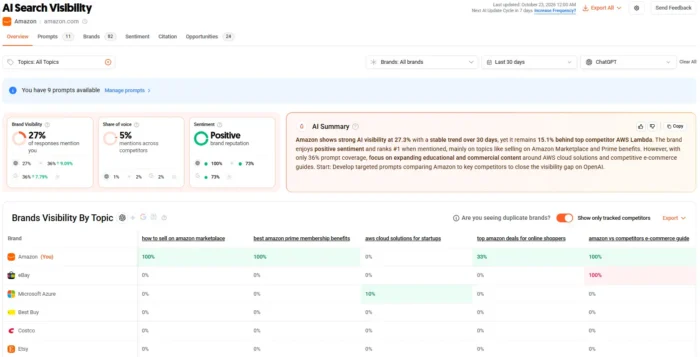
The report has five tabs:
- Overview: your Brand Visibility percentage over 30, 60 or 90 days, your Industry Rank against tracked competitors, how many AI responses were analyzed, and charts comparing your visibility with competitors over time.
- Prompts: the actual questions people ask, which platform each one came from, where your brand ranked in the answer, and which other brands were mentioned. You can export it all as CSV.
- Sentiment: whether AI mentions of your brand read as Positive, Neutral or Negative, broken down by keyword, topic and platform. Getting mentioned is good. Getting recommended is better, and this is where you see which one is happening.
- Citations: which pages AI uses as sources when it answers, and if those pages are yours, a competitor’s or a third party’s. You see your citation share, how you rank against competitors, and the most cited pages and domains in your industry. The Citation Opportunities view lists the third-party pages AI cites that name your competitors but not you. That’s a ready-made outreach list.
- Opportunities: everything above, turned into a to-do list ranked by impact. It covers three areas. First, technical fixes so AI can read your site: non-indexable pages, AI crawlers blocked in your robots.txt (with a snippet ready to paste), an llms.txt file generated for you if you don’t have one, plus issues like broken links and slow pages. Second, content to create, based on the prompts where AI cites your competitors instead of you. Third, third-party sites to get mentioned on. You set a status on each item, and technical fixes get verified on your next site audit.
For agencies, that puts the whole GEO workflow in one place: see where AI mentions a client, see which sources it trusts, work through the fixes, and show progress item by item. Citations and Opportunities compare you against your tracked competitors, so add them when you set up the project.
What you get depends on your plan:
- Individual: 1 brand, 10 prompts, refreshed monthly
- Business: 7 brands, 15 prompts each, refreshed every two weeks
- Enterprise: 15 brands, 20 prompts each, refreshed weekly
If you need more coverage, a +25 Prompts add-on is available on every tier. Free users get a basic version so they can try the feature.
Site Audit, Now Inside WordPress
Ubersuggest’s Site Audit gives you an SEO score, your crawled pages, and every issue grouped into errors, warnings and recommendations, plus desktop and mobile speed scores.

If your site runs on WordPress, the Ubersuggest SEO Tools plugin brings that audit into wp-admin. For missing meta descriptions, title problems and missing H1s, it drafts an AI fix with a before-and-after preview. You edit it or regenerate it, then apply it to the page. It works alongside Yoast SEO and Rank Math without creating duplicate tags.
For agencies managing dozens of client sites, that cuts out a lot of copying and pasting between tools.
Ubersuggest Inside Claude and ChatGPT
Ubersuggest connects to both Claude and ChatGPT. In Claude, you’ll find it in the connectors directory. In ChatGPT, it’s available as an app. Once you connect your account, the assistant can pull your real Ubersuggest data into the conversation: keyword research, competitor analysis, backlinks, site audits, content ideas and AI Search Visibility. You ask “what keywords is this competitor ranking for that I’m not?” and get an answer built on actual data, with no CSV export.
Data access follows your Ubersuggest plan limits.
Ubersuggest Pricing
Ubersuggest’s plans:
- Individual: $29/month ($16/month billed yearly, $192/year). 1 user, 1 project (brand), 125 tracked keywords, 150 searches a day
- Business: $49/month ($27.17/month billed yearly, $326/year). 2 users, 7 projects (brands), 150 tracked keywords per project, 300 searches a day
- Enterprise: $99/month ($54.75/month billed yearly, $657/year). 5 users, 15 projects (brands), 300 tracked keywords per project, 900 searches a day
- Custom: priced on request for agencies and brands that need their own limits on users, projects, prompts and credits
Every plan includes AI Chat, AI articles each month and ChatGPT and Gemini data in Keyword Research. Enterprise adds Google AI Overview data too. Monthly plans come with a one-time 7-day free trial, and you can cancel at any time.
There’s also a lifetime option: you pay once and never get a monthly bill. Lifetime Individual is $290, Business is $490 and Enterprise is $990. One difference to know: on lifetime plans, AI prompts run on demand rather than on a monthly, biweekly or weekly schedule, and full access to Opportunities requires an add-on.
What Does Moz do Best?
Moz Pro is an all-in-one SEO suite with Keyword Explorer, Link Explorer, Site Crawl and Rank Tracker. Its strengths come down to a few things:
- Domain Authority. It’s Moz’s own metric, and some clients still judge progress by it. If that’s your reporting standard, Moz speaks their language.
- Moz Local. A separate product for managing business listings across directories, useful for multi-location businesses.
- API access. The Moz API lets developers pull Moz data into custom dashboards.
- AI prompt volume. Every Moz Pro plan includes AI Visibility dashboards, with prompts tracked weekly across GPT, Gemini and Google AI Mode. Standard covers 150 prompts across 3 dashboards, which suits large brands that want broad coverage on a single site.
Moz Pricing
Moz Pro’s plans at the time of writing:
- Standard: $99/month ($79/month billed yearly). 1 user, 3 tracked sites, 300 tracked keywords per month
- Medium: $179/month ($143/month billed yearly). 2 users, 10 tracked sites, 1,500 tracked keywords per month
- Large: $299/month ($239/month billed yearly). 3 users, 25 tracked sites, 3,000 tracked keywords per month
Moz Local is priced separately, there’s no lifetime plan, and the free trial is only offered on Medium.
Is There a Free Version of Ubersuggest or Moz?
Ubersuggest has a free plan, and its monthly plans come with a one-time 7-day free trial. The free plan gives you a limited number of daily searches for keyword and domain data, plus a basic version of AI Search Visibility so you can see how AI tools talk about your brand before you pay anything.
Moz offers a free trial on its Medium plan, and the Mozbar extension is free to use.
Which Tool Is Better for Tracking AI Search?
For most teams, Ubersuggest. Both tools track AI answers now, so what matters is what you learn from that tracking and what it costs you per brand.
Ubersuggest shows you more than a mention count. Each brand you track gets its prompts, its rank inside each answer, a comparison with competitors and a sentiment breakdown, so you know if AI tools are recommending you or just listing you.
Then it goes a step further: Citations shows which sources AI trusts, and Opportunities tells you what to fix, what to write and where to get mentioned to show up more often. An agency on the Business plan can track 7 brands for $49/month. On Moz, $99/month gets you 3 AI Visibility dashboards.
Moz tracks a larger number of prompts per plan. If you’re a large brand that wants hundreds of prompts tracked weekly, that volume can be worth paying for. If you’re a small team, an ecommerce store or an agency that wants to know how AI tools talk about each client, Ubersuggest covers it for a fraction of the price.
Who Should Choose Ubersuggest, and Who Should Choose Moz?
Choose Ubersuggest if you:
- Need keyword research, content ideas, audits and rank tracking without paying enterprise prices
- Want to track how ChatGPT, Gemini and other AI tools mention your brand or your clients’ brands, including sentiment
- Want a prioritized GEO to-do list for each client, from technical fixes to outreach targets
- Want AI help writing content, not just briefs
- Run WordPress sites and want audit fixes applied without leaving wp-admin
- Already use Claude or ChatGPT and want SEO data inside the conversation
- Prefer to pay once with a lifetime plan instead of a monthly bill
Choose Moz if you:
- Report to clients who measure progress in Domain Authority
- Manage local listings for multi-location businesses through Moz Local
- Need API access to build your own dashboards
FAQs
Is Ubersuggest cheaper than Moz?
Yes. Ubersuggest’s Individual plan is $29/month, or $16/month billed yearly. Moz Pro starts at $99/month, or $79/month billed yearly. Ubersuggest also offers a lifetime plan from $290, which Moz doesn’t.
Is Ubersuggest a good Moz alternative?
Yes, for most marketers. It covers the same core work (keyword research, backlinks, site audits and rank tracking) and adds AI Search Visibility with sentiment, citations and a GEO action list, an AI Writer, AI Chat, a WordPress plugin and connectors for Claude and ChatGPT, starting at under a third of Moz’s entry price.
Does Ubersuggest show Domain Authority?
Yes. Ubersuggest shows Domain Authority in its domain and backlink reports, alongside traffic estimates, ranking keywords and referring domains.
Can Ubersuggest track my brand in ChatGPT?
Yes. AI Search Visibility tracks how often your brand appears in AI answers from tools like ChatGPT and Gemini, where it ranks in those answers, and how positive, neutral or negative each mention is.
Does Ubersuggest show which sources AI cites?
Yes. The Citations tab shows which pages AI uses as sources, if they’re yours, a competitor’s or a third party’s, and which third-party pages cite your competitors but not you.
Is Ubersuggest good for agencies?
Yes. The Business plan tracks 7 brands with AI Search Visibility for $49/month, Enterprise covers 15 brands and 5 users, and Custom plans are available for larger agencies.
Does Moz have a lifetime plan?
No. Moz Pro is billed monthly or annually. Ubersuggest is the only one of the two with a lifetime option, starting at a one-time $290 for the Individual plan.
Conclusion
If you want keyword research, content planning, audits and AI search tracking without paying a premium, pick Ubersuggest. You get more of the day-to-day SEO work covered, plus a clear view of how AI tools talk about your brand, for a fraction of the price.
Moz still has a place if Domain Authority, local listings or custom API reporting sit at the center of your work.
The easiest way to decide is to try it on your own site. Start with Ubersuggest’s free plan, run your domain, and see what AI tools are already saying about your brand. When you want the full AI Search Visibility report, start the 7-day free trial on the monthly Individual plan.
Do you use Ubersuggest, Moz, or both? Tell me in the comments what you’d recommend to someone choosing today.
Recent Comments